


What are SharePoint Site Properties
SharePoint site properties are an underused feature that can unlock can unlock noteworthy governance and compliance scenarios, especially when combined with Microsoft Purview.
In this post, I’ll focus on custom SharePoint site properties: what they are, why governance matters, and a few real-world examples of how to use them.
At a high level, site properties are key–value pairs stored on a SharePoint site (often referred to as the property bag). Because these values are not centrally enforced and are typically free text, you’ll get the most value from them when you pair them with clear governance (naming conventions, allowed values, and ownership).
In practice, most organizations apply site properties via a provisioning flow (for example, a request form, Power Apps, or a provisioning engine). For existing sites, you can also run a one-time script to retrofit properties at scale. With that foundation in place, let’s look at a few common use cases.
Use case 1: Adaptive scopes in Microsoft Purview
You can map custom site properties to Refinable Strings in the SharePoint search schema. Once that mapping is in place, you can build an adaptive scope in Microsoft Purview that targets those refinable values, making it possible to apply Purview policies based on metadata you control at the site level.
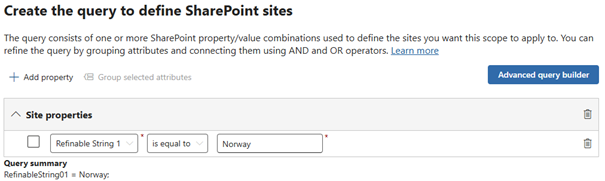
This is useful when policies vary by country/region, business unit, or another organizational attribute. For example, you can use an adaptive scope to (1) apply a retention policy only to sites tagged with a specific country, or (2) publish retention/record labels only to the sites that need them to comply with regional or sector specific regulations. The big win is that the scope stays dynamic: new sites inherit the right policies as soon as the correct property is set and properties and policies is given time to crawl.
Note: Adaptive scope support for Data Loss Prevention (DLP) policies is on the roadmap.
Use case 2: Better SharePoint governance and reporting
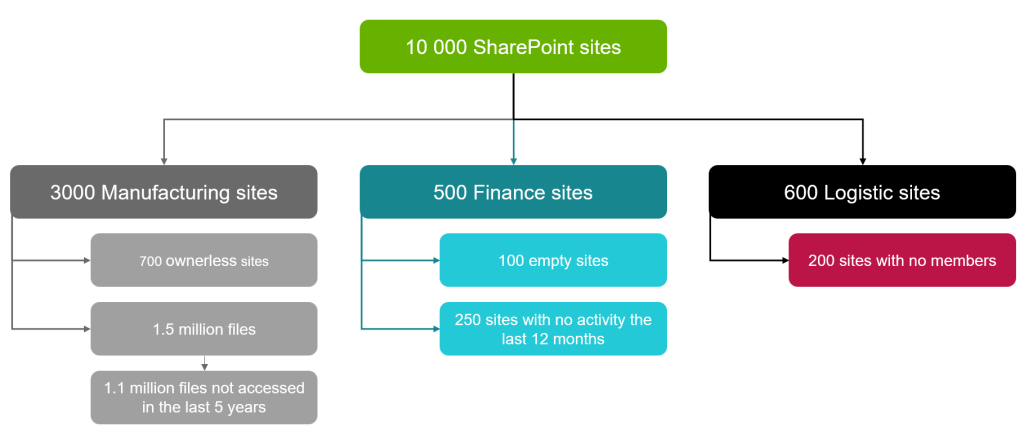
As your tenant grows, it becomes harder to keep a clear overview of what sites exist, who owns them, and whether they follow internal standards. Once you have site properties in place, you can use them as building blocks for governance reporting.
For example, if you bring site properties into a Power BI model, you can create a dynamic report that filters sites by business unit, sensitivity, geography, lifecycle status, and more. You can also tailor access so stakeholders only see their slice, e.g., a manager in Finance can view governance data for Finance sites, without seeing other departments.
How to set custom site properties (PowerShell quick guide)
Property bag values can be set with PowerShell. Before you set them, make sure one of the following prerequisites is true:
- Custom scripting is allowed on the site
- Tenant settings allow web property bag updates (SPOTenant)
If the prerequisite is met, you can set a property bag value like this (add -Indexed if you want to map it in search):
Set-PnPPropertyBagValue -Key “<PropertyBagKeyName>” -Value “<PropertyBagValue>” -Indexed
To govern keys and values at scale, it’s usually best to integrate site properties into your site provisioning process. The person requesting a site selects values from an approved list, and an automated runbook applies the properties (and any related configuration) in the background.
Tip: You can inspect a site’s property bag without PowerShell by browsing to the site’s REST endpoint: https://<tenant>.sharepoint.com/sites/<site>/_api/web/allproperties
https://<tenant>.sharepoint.com/sites/<site>/_api/web/allproperties
See the possibilities with site properties
The examples above are only a starting point. Custom site properties can also help you:
- Improve SharePoint search experiences with property-based filters and refiners
- Target news or communications to sites owned by a specific business unit
- Support lifecycle management (e.g., review dates, owner, purpose, or status)
- Enable automation flows that act differently based on site metadata
Want help implementing custom SharePoint site properties, or are you already using them and looking to increase the value? Reach out at contact@infotechtion.com. We’re happy to assist you in better optimizing your organizations use of site properties in SharePoint and improving your information architecture.
