


Conversations about Copilot usually start with licenses, training and adoption. Questions about agents tend to come later, and they are harder to answer, because agents do not arrive through a rollout. Makers build them in Copilot Studio and Agent Builder, vendors ship their own, and Microsoft adds more with every release. After a few months someone in security or compliance asks how many agents the organization actually has, and nobody is sure.
That question is what Agent 365 is meant to answer. It lives in the Microsoft 365 admin center and gives administrators a registry of the agents in the tenant, the tools they can use and the settings that control who may build and share them. I opened it in the tenant I looked at and went through it page by page. This article describes what I found and which parts deserve your attention first. It is written for admins, security and compliance colleagues who have been asked to do something about shadow AI and are not yet sure what that means in practice. By shadow AI I mean AI that is in use without IT, security or compliance having a clear view of it.
What the overview shows
The first page is the Agent 365 overview. It shows the agent registry, the number of tools, a handful of actions that need attention and some charts. In this tenant the registry held 457 agents and the tools counter showed 1,065.
What I did not expect was where the agents came from. According to the chart on agents by creator, 29 were created by the organization itself, 390 by external partners and 38 by Microsoft. I had assumed that most of what I would find was built by our own makers. Instead, the larger part had arrived with third party platforms and products.
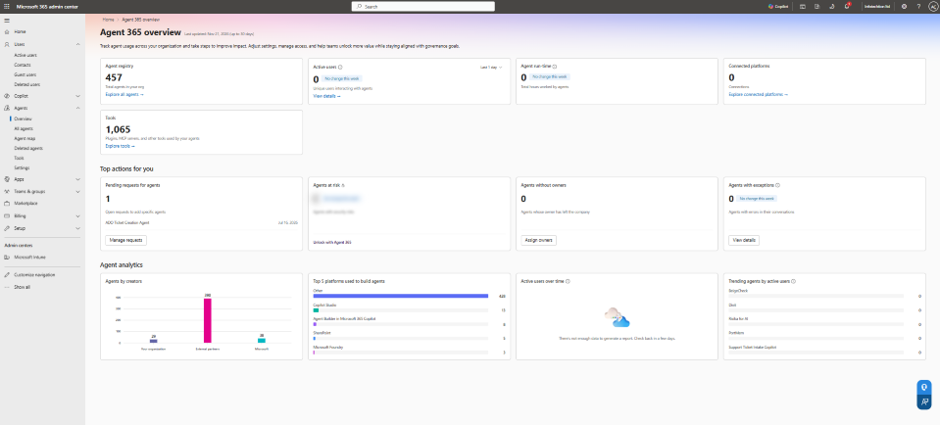
The Agent 365 overview with the registry, the tool count and agents by creator.The Agent map makes this easier to see. Each circle is a platform. Third party agents form the largest one with 391, followed by Microsoft with 38, Copilot Studio with 13, Agent Builder with 8, SharePoint with 5 and Foundry with 3. Every circle is a separate way into the tenant, built and managed by different people, so it makes sense to look at them one by one instead of treating all agents as a single group.
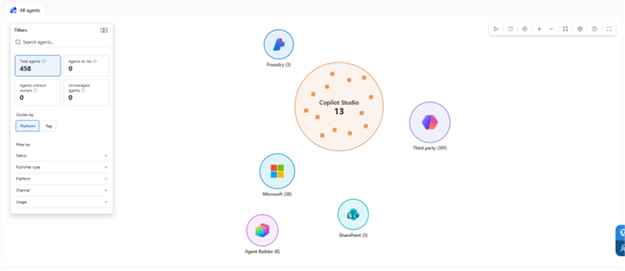
The Agent map groups agents by platform.Most of these agents had not been used yet. The overview reported no active users and no agent run time for the selected period. A full registry with usage still at zero looks like a good moment to agree on rules, before people form habits around whatever happens to be available.
Owners, tools and sharing
Opening an individual agent shows more than I expected. The ADO Ticket Creation Agent, for example, reads customer support emails, extracts the issue details and creates Azure DevOps tickets. A support team built it with Agent Builder and a request to publish it was waiting for review. The detail pane lists who created it, who publishes it, which platform it runs on and who owns it, and it has tabs for users, data and tools, security, permissions and activity. An agent like this is exactly what a team builds to save time, and it is a good example of something governance should see early and without getting in the way.
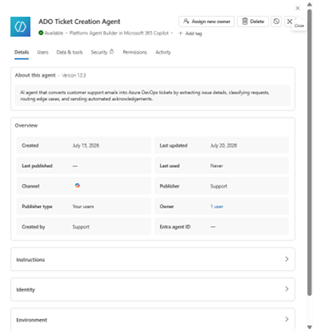
The detail pane of a single agent.Ownership matters more over time than at the start. The overview has a card for agents without owners, which means agents whose owner has left the company, together with an action to assign a new one. I would check it regularly, the same way many teams check stale guest accounts.
The Tools page lists plugins, skills, MCP servers and connectors. This tenant had 545 plugins and 511 MCP servers, each with details and an option to install or block it. Nobody will review that many in one sitting, and I did not try. What helps is treating the page like app consent in Entra ID, with a regular look at what has been added and a clear decision about what is allowed.
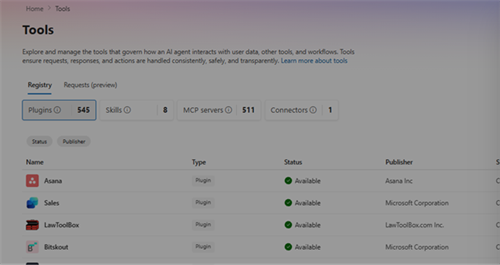
The Tools registry with plugin details.The Agent settings page brings the main controls together, including agent and plugin access, policy templates, tags and sharing.
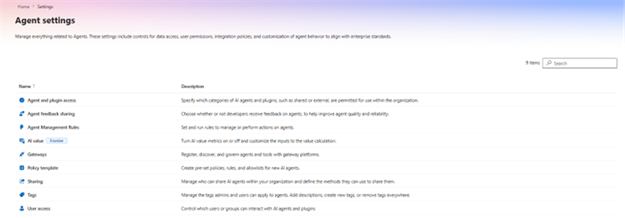
Agent settings.Sharing is a good one to start with. Here, sharing Agent Builder agents with everyone in the organization is set to No users. People can still share with individual users and security groups, so teams can work together while a prototype cannot turn into an organization wide dependency with one click.
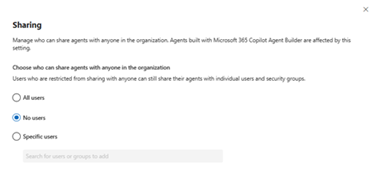
The sharing setting for Agent Builder agents.Where I would start
If I were responsible for this, I would spend the first hour just looking at the overview and the Agent map, without writing any policy. That tells you which platforms matter in your tenant and which do not. After that I would make sure every agent has an owner, because an owner is the simplest control available and makes the later steps easier. Then I would talk to the people building agents. Most of them are trying to save time, and a sensible sharing default with a short review step will usually work better than a ban.
The data side needs attention as well. Agents often reach content through the permissions people already have, and in many tenants that is more than anyone intended. Agent 365 shows which agents exist, while Microsoft Purview and Entra decide what they can touch, so sensitivity labels and access cleanup belong in the same plan.
If you open the overview in your own tenant this week, write down the first number you see. It gives you a much better starting point for the conversation with your security and compliance colleagues than any assumption.
About the author
Dogan Colak is a Microsoft 365 Copilot MVP and AI and Data Specialist at Infotechtion. He works hands on in Microsoft Purview, AI Governance and Zero Trust projects and has delivered workshops and trainings as a Microsoft Certified Trainer.
